
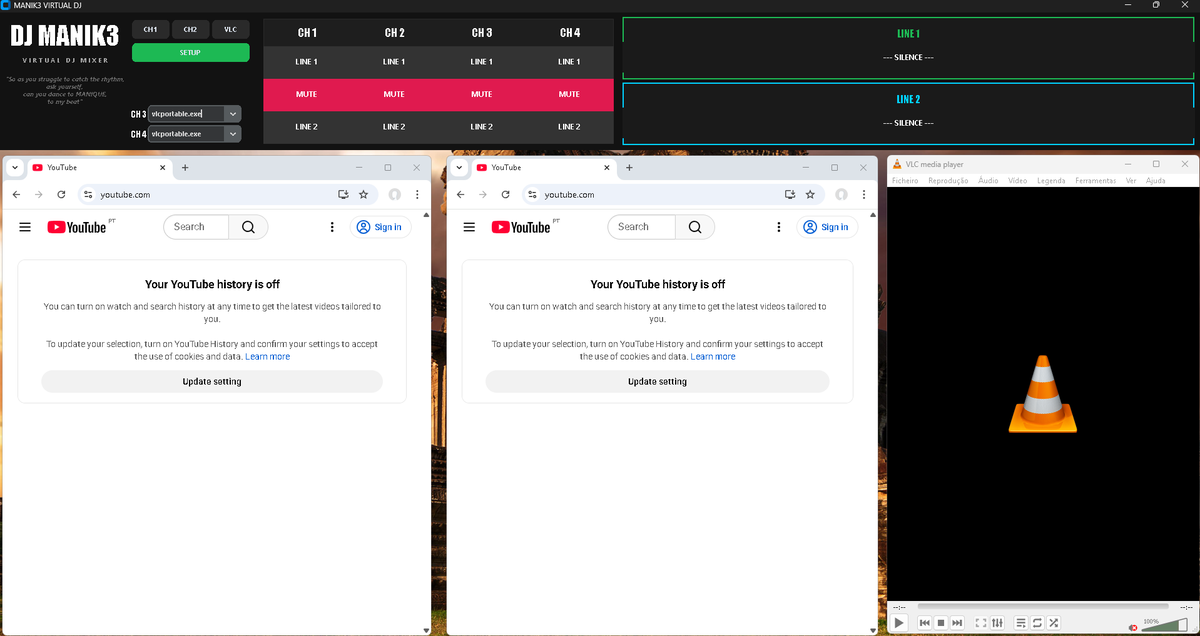
- Dynamic Audio Routing: Utilizes underlying Windows APIs (via SoundVolumeView) to force specific application PIDs to output to designated sound cards (LINE 1 or LINE 2).
- State Management & Anti-Collision: Includes built-in logic to prevent audio collisions (e.g., preventing Chrome 1 and Chrome 2 from outputting to the same channel simultaneously), reverting to the last known safe state automatically.
- Auto-Setup Wizard: A built-in dependency manager that automatically detects missing environments, connects to GitHub Releases, and safely downloads/extracts isolated portable apps without user intervention.
- Live Process Hooking: Scans the Windows task list in real-time to detect active media processes (VLC, Spotify, PiKaraoke, Edge) and populates them into the mixer matrix.
- Integrated Launchpad: Launches configured applications with specific isolation arguments directly from the UI (e.g., launching separate, clean Chrome profiles).
- God Mode (Auto-Admin): Automatically requests and elevates to Windows Administrator privileges upon launch to ensure seamless registry and audio state modifications.
- Live Monitoring: Visual displays that track exactly which applications are actively broadcasting to which physical hardware lines.
- Frontend: Built with
customtkinterfor a modern, dark-themed, and responsive UI. - Backend Logic: Python
subprocessandctypesfor executing shell commands, routingstdout/stderrstreams, and interacting with the Windows Shell. - Audio Engine Broker: Interfaces with NirSoft's
SoundVolumeViewCLI to execute/SetAppDefault,/Mute, and/Unmutecommands silently in the background. - CI/CD Pipeline: Fully automated GitHub Actions workflow that compiles the standalone executable via
PyInstallerand pushes to GitHub Releases upon version tagging.
Thanks to the integrated Auto-Setup Wizard, installing MANIK3 is entirely automated.
If you just want to use the application without installing Python, use the standalone package:
- Go to the Latest Release page on GitHub.
- Download the
MANIK3_Virtual_DJ_Windows.zipfile from the assets list. - Extract the
.zipfile into a dedicated folder on your computer. - Open the extracted folder and double-click
MANIK3_Mixer.exe. - The Auto-Setup Wizard will automatically launch, connect to the cloud, download the NirSoft Audio Engine and the required Portable Applications (Chrome & VLC), and build your workspace in seconds.
- Operating System: Windows 10/11 (Required for the specific audio API hooks).
- Install Python: Ensure Python 3.x is installed and added to your system PATH.
- Install Dependencies: Open your Command Prompt (cmd), navigate to this project folder, and run:
pip install -r requirements.txt
- Run the Matrix:
(Note: The Auto-Setup Wizard will automatically fetch and extract the
python mk3_mix_gui.py
apps/directory andSoundVolumeView.exeon your first run).
- Setup: Click the
⚙️ SETUPbutton to map your physical/virtual audio devices to LINE 1 and LINE 2. - Launch: Use the top Launchpad to open your isolated media applications. (Chrome 1 and Chrome 2 use strictly isolated user profiles to prevent data collision).
- Mix: Use the 4-channel matrix to seamlessly route or MUTE applications on the fly. The UI will glow Green for Line 1, Cyan for Line 2, and Red for Mute.
- Apply: Click
▶ APPLY MIXto execute the shell commands and lock in the audio routing.
This application modifies Windows default audio endpoints on a per-application basis. Ensure you have the correct audio drivers installed and that applications are currently outputting audio (unmuted in the Windows volume mixer) for the hooks to latch onto them successfully.
This project utilizes SoundVolumeView created by Nir Sofer (NirSoft) as the core audio manipulation engine. SoundVolumeView is distributed as freeware and is included in this repository under the terms of the NirSoft freeware distribution license.
Comentários (0)
Sê o primeiro a comentar!
Deixar um Comentário
Os comentários estão sujeitos a aprovação e proteção anti-spam.